The one rule: match the voltage
Most LED trouble in arcade cabinets comes from one mistake: connecting a part to the wrong supply. LED buttons, strips and marquee lights are each made for a specific low voltage, and that rating is printed on the part, the packaging or the listing. Match it to the rail you are feeding, and the rest is routine wiring.
Wikipedia's LED strip article (a secondary source) says most strips run on 12 or 24 volts DC, that USB-powered strips run on 5 volts, and that mains-voltage strips also exist. Low-voltage strips need a separate power supply. Constant-voltage designs are sensitive to input voltage and to voltage drop along long runs from a single feed. Arcade LED buttons add their own ratings, so do not assume which one your parts expect. If a listing does not state the voltage, ask the seller or pick a part that does. Too much voltage can burn out an LED or its built-in resistor, and too little gives a dim or flickering light.
LED buttons
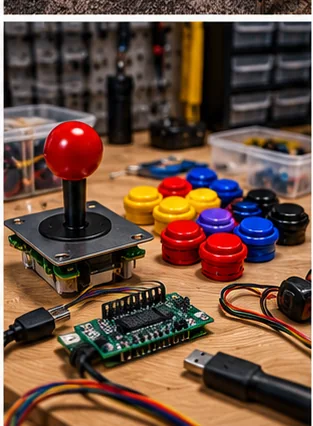
An LED button has two electrical sides. The microswitch carries the signal to your controller, and the LED lamp has its own power connection. They are separate, which is why a lit button needs extra wires beyond the normal switch wiring.
- Check whether the button sold for your voltage and whether the LED has a built-in resistor; the listing should say
- Note polarity, since an LED lights in one direction only
- Plan a shared positive feed and a shared ground, run as a daisy chain or a small bus, so you do not have a separate wire pair for every button
- Keep LED wires away from the signal wires when you can, because the control panel gets crowded
Some encoder boards and controllers can drive button LEDs on their own, which lets software light buttons only when a game uses them. That is nice to have but not required. If you want that feature, confirm that your board supports LED outputs and how much current each channel handles. The USB encoder guide covers boards, and the microswitch and wiring post explains the signal side.
As an eBay Partner, I may be compensated if you make a purchase.
Marquee lighting
A marquee is a printed sheet or translucent panel above the screen, lit from behind. LED strips are the usual choice because they run cool and fit in a narrow box. A few details separate a clean marquee from a streaky one.
- Space the strip back from the panel so the light spreads before it hits the artwork; strips pressed close show a row of hot spots
- Use a diffuser or a white-lined box to even out the glow
- Pick a color temperature that suits the artwork, since a very cool white can wash out warm colors
- Keep the strip away from the screen's edge so the marquee light does not glare on the display
Choose a strip with its own power rating clearly stated, and a supply with headroom above what the strip draws, using the maker's figures. For layout and glare tips, see the arcade lighting guide.
Underglow and trim
Underglow is a decorative strip fixed under the cabinet so the floor glows around it. Trim lighting runs along the sides or the control panel edge. Neither affects play, so the choice is mostly about look and about how well the strip stays put.
Adhesive backing fails on dusty, painted or textured surfaces. Clean the surface first and let it dry, and consider small clips if the strip will carry a lot of heat or vibration. Keep strips away from vents and from the hot parts of a PC or power supply, and do not cover ventilation openings with anything. A cabinet that traps heat shortens the life of its parts, as the ventilation guide explains.
Single-color strips are the simplest. The Wikipedia article explains that non-addressable strips show one color at a time and need an external dimming controller, while addressable strips have a chip per LED for chase and color effects. The extra control adds wires and more things to fail, so choose it only if you want effects. It also warns that uncoated tape can be shorted by fine metal objects, so keep loose screws and filings out of a cabinet before you light it.
Power and switching
Decide where the lights get power and whether they switch with the cabinet. If your LEDs run from a spare connection on the same supply as the rest of the cabinet, they come on and go off with the machine. If you add a separate adapter, plug it into the same switched strip so you do not leave lights running all night. The power supply guide helps you plan capacity.
Do not split a supply's output beyond its rating. Add up the draw from every part using the makers' figures and leave margin. If a supply has no spare capacity, add a separate supply rather than overloading it, and keep the mains side of anything in a fused, enclosed assembly done by someone qualified.
A simple wiring approach
- List every LED part and write down its rated voltage.
- Group parts that share a voltage and pick a supply or rail for each group.
- Run a positive and a ground line along the panel and tap them for each button.
- Use crimped or soldered, insulated connections, not twisted wire and tape.
- Test the lights with the panel open before closing the cabinet.
- Secure the wiring so moving panels do not pull on it.
The cable management guide covers tidy runs and strain relief.
Common LED mistakes to avoid
- Feeding a part from a rail that does not match its rating
- Ignoring polarity, which leaves a button dark and sometimes damages the LED
- Running a strip so close to the monitor that its light glares on the screen
- Covering vents or fans with strips, tape or wiring
- Skipping a test before the panel is closed, then reopening it for a loose wire
- Adding up the draw wrongly and overloading a supply that also runs the PC
Most of these are cheap to avoid. Write down each part's rating before you wire anything, test on the bench with the panel open, and add lighting in stages so you can tell which part caused a problem if something misbehaves. Lighting is the easiest upgrade to overdo, so start with the buttons or the marquee and judge the result before adding more.
Frequently asked questions
How do I know which voltage my LED buttons need?
Check the part, packaging or listing for the rated voltage. If it is not stated, ask the seller or choose a button that lists it.
Do LED buttons need extra wiring?
Yes. The LED has its own power and ground connection in addition to the switch contacts that send the button signal.
Can I power LED strips from the cabinet supply?
Only if the supply has the right voltage and spare capacity, using the makers' figures. Otherwise, add a separate supply.
Why does my marquee look streaky?
LED strips pressed close to the panel create hot spots. Space the strip back and use a diffuser.
Is underglow safe in a cabinet?
Low-voltage strips are fine when they are kept away from vents and heat, but do not cover ventilation openings and leave mains wiring to a qualified person.
Affiliate disclosure: HomeArcadeGuide.com may earn from qualifying purchases through Amazon Associates and eBay Partner Network at no extra cost to you. Manufacturer links in the source section are research references, not tracked endorsements.