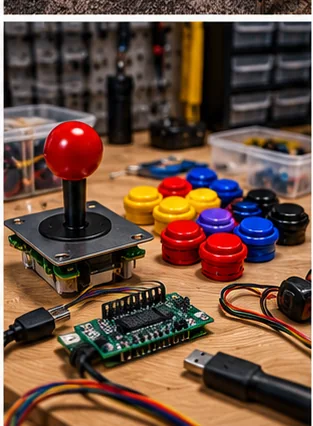
Products and configurations to compare
Zero-delay USB encoder kit
These boards are cheap, common and easy to wire with pre-made button harnesses.
Best when: you run emulators/front ends that accept generic gamepad/keyboard-style controls
Watch for: player-order and mode support vary by board
XInput arcade encoder
XInput support can reduce configuration pain for modern games designed around Xbox-style controllers.
Best when: you want Windows games to see familiar controller inputs
Watch for: some retro front ends require remapping and specialty controls may need another interface
Two-player arcade encoder
One board can produce a neat control panel if the pinout is documented and replacement hardware is available.
Best when: you want one board handling a complete two-player panel
Watch for: a single failure affects both players and connector mapping is denser
Latency is usually smaller than configuration pain
Many basic encoders are fast enough for casual retro use. Problems more often come from duplicated device IDs, Windows player ordering or games expecting a different input API.
Plan specialty controls separately
Trackballs and spinners usually appear as mouse-like USB devices. Light guns have their own tracking interfaces. Do not expect a joystick/button encoder to solve every control in the cabinet.
Common ground versus individual grounds affects wiring
Some boards provide one shared ground daisy chain; others ship two-wire harnesses to each input. Choose the wiring style that makes the panel easy to service.
LED buttons need a power plan
Illuminated buttons may require 5V/12V power separate from the input switch wiring. Do not overload an encoder header that was not designed to power dozens of LEDs.
Label every connector
Future you should be able to replace Player 1 Button 4 without tracing a bundle under the panel. Printed labels and a wiring map cost almost nothing.
Control feel is a geometry problem
Joystick throw, engage distance, spring force, gate shape, shaft height and button actuation all change how a panel feels. Japanese fighting-game parts are deliberately light and fast; classic U.S.-style controls often feel heavier and longer. Neither is universally more authentic. The right control is the one that matches the game family and cabinet you are building.
Panel thickness matters too. A control that feels perfect in a thin metal arcade panel may sit too low when mounted through thick MDF without routing. Before ordering parts, measure the mounting surface and confirm the plate, shaft length and button-body depth.
Wiring should be serviceable
A good control panel can be opened without cutting wires. Use labeled harnesses, quick disconnects where appropriate, strain relief and a clear ground scheme. The first build may work with a tangle of loose jumpers; the tenth button replacement is when clean wiring pays you back.
Before checkout
- Measure final cabinet footprint and player standing space
- Measure the entire delivery route before ordering
- Confirm game list, control layout and number of players
- Check screen size and viewing angle from normal stance/seating
- Confirm Wi-Fi/Ethernet needs and whether online features are optional
- Price stools, risers, mats and surge protection with the machine
- Check warranty, freight damage and return terms
- Confirm replacement controls or parts are realistically obtainable
- Plan ventilation and service access
- Use only game/software content you have the rights to run
Installed cost: the part listings do not show
Budget freight or local pickup, stools or seating, floor protection, surge protection, network access, extension of an existing wired network where appropriate, and an initial parts reserve. If a machine requires permanent electrical work, treat that as room infrastructure rather than hiding it inside the cabinet price. A collection that arrives under budget but has no comfortable place to stand or sit is not actually under budget.
Measure the route with packaging in mind when a machine ships assembled or partly assembled. Door width is only one constraint; stair turns, ceiling height, railings, elevators and the ability to rotate a long cabinet matter. HomeArcadeGuide's doorway and shipping planners exist to catch those mistakes before freight arrives.
How to evaluate the purchase in the first week
Play the games and controls you bought it for, not only the easiest title on the menu. Test every direction/button, both players, audio at quiet and loud levels, network reconnect after power-off, display uniformity and cabinet wobble. If it is a virtual or software-driven platform, update only after confirming the current machine works and documenting its starting state.
Keep the carton and packing material until the return window and freight-damage inspection are safely behind you. Large arcade products are unusually expensive to return, and original packaging can matter if a display or control panel needs to travel for service.
Frequently asked questions
What is a zero-delay encoder?
A common inexpensive USB interface that converts arcade joystick/button switches into computer inputs.
Do I need XInput?
Only if the games/software you use benefit from or require Xbox-style controller compatibility.
Can one encoder run two players?
Yes if it has enough inputs and software support; two separate boards can also be easier to service.
Can it run a trackball?
Usually not through the same joystick-button inputs; trackballs commonly use their own USB interface.
Primary/current sources
Affiliate disclosure: HomeArcadeGuide.com may earn from qualifying purchases through Amazon Associates and eBay Partner Network at no extra cost to you. Manufacturer links in the source section are research references, not tracked endorsements.