Products and configurations to compare
Racing cabinet or sim rig
Driving creates the biggest immediate change in body position and guest appeal.
Best when: your first cabinet is joystick/button based
Watch for: racing uses more floor depth and seating clearance
Virtual pinball
Even a compact virtual pinball machine changes the room more than another generic upright.
Best when: you want a very different game rhythm without maintaining real pinball
Watch for: full-size models take furniture-scale space
Trackball/spinner multicade
Trackball and spinner games become genuinely playable rather than awkwardly mapped to a stick.
Best when: your existing cabinet is a fighter/maze-game layout
Watch for: broad platform overlaps some game library
Inventory your control types
Write down what the first cabinet actually offers: one or two sticks, button count, trackball, spinner, wheel, guns. Buy the next machine to add a control class rather than another software list.
Inventory player posture
Standing upright, seated cocktail, pinball stance and racing seat all change how people use the room. A small collection with varied posture feels richer.
Think about guest comprehension
Dedicated cabinets are excellent because a guest recognizes the title and starts playing. Multicades can require menus. Mix both so the room has immediate and exploratory machines.
Leave one open footprint
The best machine may be released next year. A home arcade packed wall-to-wall after month one has no room to evolve.
Build a parts drawer
After two or three machines, keep spare fuses, common buttons, microswitches, USB cables, cleaning supplies and the exact tools needed to access the cabinets.
The room is the largest cabinet in the arcade
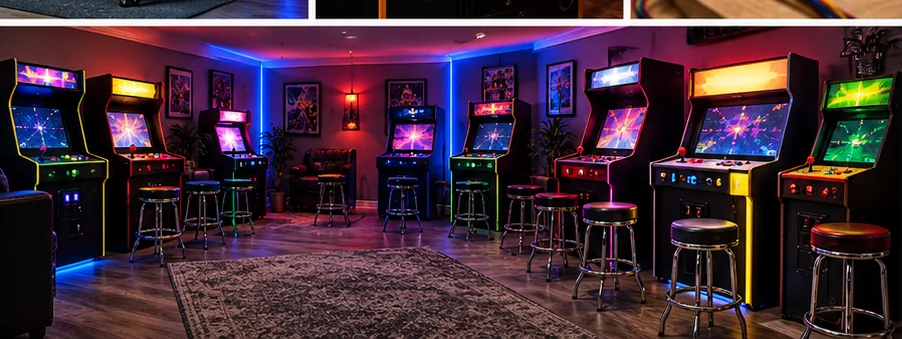
Circulation space, service access and sight lines determine whether a collection feels like an arcade or a storage locker. Leave room to stand at controls without blocking the next machine, pull a cabinet away from the wall for service, open pinball coin doors/backboxes and move stools out of the traffic lane.
The delivery route matters before the floor plan. Measure the narrowest doorway, stairs, turns and elevator dimensions, not just the final room. HomeArcadeGuide already has doorway, room and shipping planning tools for this exact reason.
Electrical planning should follow actual nameplates
Consumer LCD cabinets often draw modest power individually, but a room of machines plus lighting, TVs, mini-fridges, amplifiers and simulators can become a significant continuous load. Estimate the machines you plan to run together, leave headroom and have fixed circuit work handled appropriately. Avoid building the room around daisy-chained power strips and extension cords.
Before checkout
- Measure final cabinet footprint and player standing space
- Measure the entire delivery route before ordering
- Confirm game list, control layout and number of players
- Check screen size and viewing angle from normal stance/seating
- Confirm Wi-Fi/Ethernet needs and whether online features are optional
- Price stools, risers, mats and surge protection with the machine
- Check warranty, freight damage and return terms
- Confirm replacement controls or parts are realistically obtainable
- Plan ventilation and service access
- Use only game/software content you have the rights to run
Installed cost: the part listings do not show
Budget freight or local pickup, stools or seating, floor protection, surge protection, network access, extension of an existing wired network where appropriate, and an initial parts reserve. If a machine requires permanent electrical work, treat that as room infrastructure rather than hiding it inside the cabinet price. A collection that arrives under budget but has no comfortable place to stand or sit is not actually under budget.
Measure the route with packaging in mind when a machine ships assembled or partly assembled. Door width is only one constraint; stair turns, ceiling height, railings, elevators and the ability to rotate a long cabinet matter. HomeArcadeGuide's doorway and shipping planners exist to catch those mistakes before freight arrives.
How to evaluate the purchase in the first week
Play the games and controls you bought it for, not only the easiest title on the menu. Test every direction/button, both players, audio at quiet and loud levels, network reconnect after power-off, display uniformity and cabinet wobble. If it is a virtual or software-driven platform, update only after confirming the current machine works and documenting its starting state.
Keep the carton and packing material until the return window and freight-damage inspection are safely behind you. Large arcade products are unusually expensive to return, and original packaging can matter if a display or control panel needs to travel for service.
Frequently asked questions
What should my second arcade machine be?
Usually a different control/play category than the first: racer, pinball, trackball/spinner or two-player fighter.
Should I buy another Arcade1Up?
Yes if it adds a genuinely different game/control experience rather than duplicating the first.
When should I buy pinball?
When you have the depth/side clearance and want a seated/standing mechanical-style experience distinct from video uprights.
How much empty room should I leave?
Enough for service access and at least one future machine if the collection is still evolving.
Primary/current sources
- HomeArcadeGuide — current homepage and planning philosophy
- HomeArcadeGuide — planning tools
- HomeArcadeGuide — platform library
Affiliate disclosure: HomeArcadeGuide.com may earn from qualifying purchases through Amazon Associates and eBay Partner Network at no extra cost to you. Manufacturer links in the source section are research references, not tracked endorsements.