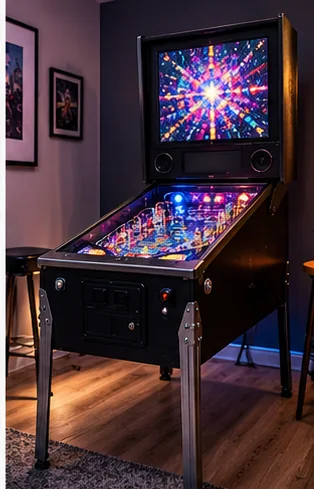
Start with the seller, not the machine
The most useful test of a used pinball machine happens before you drive anywhere: ask for the exact title and year, a video of the machine powered on and playing a full game, and photos of the cabinet interior. A seller who has owned the machine for a while should answer plainly about what works, what has been replaced and what has not.
Ask these questions in writing, and keep the answers:
- When were the flippers last rebuilt?
- Are the keys, manual and any original parts included?
- What work or improvements have been done?
- Are there known problems, or has the machine been modified, for example drilled for free play?
Home Pinball Repair, whose buying guide was read for this article, notes that most private sales are as-is, so repairs become yours once you pay. It also helps to know your limits. A machine that needs only cleaning and rubbers suits a first-time owner, while one needing board work or a new playfield suits someone with the tools and patience.
The inspection map
Work through the machine in the same order each time so you do not skip a section while a seller is talking to you.
| Area | What to look for | Why it matters |
|---|---|---|
| Cabinet | Water damage, dents, sun fading, rust on legs, coin door and lockbar | Water damage is hard to repair; rust is usually fixable |
| Playfield | Worn-through paint, peeling, planking (wood separating in vertical lines), cloudy or lifting mylar patches | Broad wear to bare wood cuts value; planking is serious |
| Plastics | Broken or missing pieces, especially slingshot covers | Replacements exist for popular titles but cost real money |
| Backglass or translite | Flaking paint on older painted glass; cracks; condition of a translite | A cracked backglass is nearly worthless to a collector |
| Flippers and rubbers | Strong, matched flippers; hard or worn rings; shooter rubber | Flippers and their switches wear most; rubber is cheap to fix |
| Lights and display | Lamp test, always-on lamps under plastics, missing display segments | Display replacement can be a real expense |
| Inside the machine | Discolored connectors, charred wiring, battery leakage, soldered-on wiring where plugs belong | Heavy damage can mean walking away |
| Glass, lockbar, keys | Glass slides easily, locks work, backbox keys present | Missing keys and stiff glass are annoying later |
Rubbers, bulbs and cleaning are cheap fixes. The playfield, the backglass and water-damaged wood are the ones that can sink the deal.
The power-on test
Ask the seller to turn the machine on while you watch. Look for a normal startup, working display and lights across the playfield, and listen for a repeating sound or a burning smell. Open the machine's service or test menu if it has one: Home Pinball Repair says errors usually show up there unless the seller cleared them.
Play a full game, ball by ball. Both flippers should work every time, and the ball should return from the drain and launch without sticking. Run the manual's coil and switch tests if you can. The same guide says a dead row or column of switches hints at a board or wiring problem, while one dead switch may only need cleaning or adjustment. If a coil stays energized, turn the machine off at once, since it can burn out.
Look for battery leakage on solid-state boards. Home Pinball Repair says heavy leakage may be a reason to walk away. Leave any board repair to a qualified technician. Check the power cord too: a solid-state machine needs a grounded outlet, and the guide flags a missing ground pin as a shock hazard.
Stay out of the machine when it is on
Lifting the playfield and glass takes two people, so bring a helper. Look under the playfield only with the machine off and unplugged, and follow the manual for how the playfield lifts or the glass comes out.
Buying from photos and video
If you cannot visit, ask for more than the listing shows. Request a video of a complete game, close-ups of the playfield around each flipper and the busiest shots, the underside, the coin door interior, the backbox with the glass lifted, and the serial number plate. Ask whether anything has been repainted or touched up, since a fresh coat can hide wear.
Plan the move before you commit. A used machine is heavy, and freight is its own project, covered in freight and stair access for cabinets. Measure doorways and turns, and read the doorway and route planning guide. If you pay before pickup, use a method that gives you recourse if the machine is not as described, and get the condition in writing.
When to walk away
- The seller will not power the machine on or show it running.
- The playfield shows worn-through paint across several shots, or planking.
- Water damage, swollen wood or a musty smell.
- Burn marks, melted wire insulation or a burnt smell inside.
- Heavy battery corrosion on the main board.
- The seller cannot give you the exact title, or says parts are just missing.
Any one of these can still be a bargain for an experienced restorer. If this is your first machine, pass and wait for a better example.
As an eBay Partner, I may be compensated if you make a purchase.
What to do after you buy
Expect a small punch list. Level the machine in its final spot (see leveling a pinball machine at home), replace tired rubbers using the rubber kit guide, and clean the playfield with a playfield-safe product. The pinball machine buying guide and the used arcade machine inspection guide cover the wider buying side.
Frequently asked questions
What is the first thing to check on a used pinball machine?
Ask to see it powered on and playing a full game. A machine that starts normally and plays without resets answers most early questions.
What is the most expensive problem on a used pinball machine?
Playfield wear and planking, water damage and a cracked backglass are the hardest to fix. Rubbers, bulbs and cleaning are usually cheap.
Can I inspect a pinball machine from photos?
You can narrow the field. Ask for a video of a full game, close-ups of flippers and the busiest shots, the underside, the backbox and the serial number.
Is it safe to look inside a pinball machine?
Only with the machine off and unplugged, because it carries mains voltage. Leave coils, boards and power supplies to a qualified technician.
Should a first-time buyer pick a project machine?
Usually not. A working, well-kept machine is easier to enjoy and to learn on than one that needs board or playfield work.
Affiliate disclosure: HomeArcadeGuide.com may earn from qualifying purchases through Amazon Associates and eBay Partner Network at no extra cost to you. Manufacturer links in the source section are research references, not tracked endorsements.