Products and configurations to compare
Legends Pinball Micro HD
AtGames currently lists 23.6×12.36×22.64 inches and 24.27 lb, making the Micro dramatically easier to store and move.
Best when: you live in an apartment or want a movable pinball cabinet
Watch for: small playfield reduces physical scale and spectacle
Legends Pinball 4KP
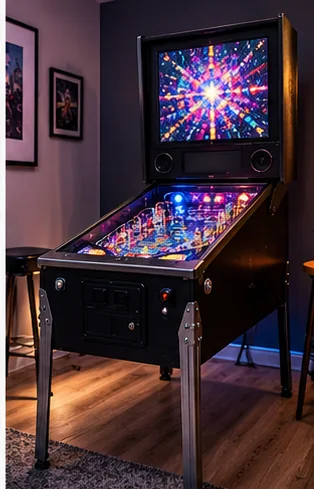
The current 4KP line is designed as a premium virtual pinball cabinet rather than a compact tabletop.
Best when: you have dedicated floor space and want the larger 32-inch 4K-class experience
Watch for: higher purchase cost, heavier furniture-scale footprint
Arcade control panel accessory
AtGames currently sells a drop-in control panel with joystick, six buttons and full-size trackball for compatible Legends Pinball families.
Best when: you want compatible Legends pinball hardware to double as an arcade control station
Watch for: check exact 4KP/HD/HDP compatibility before ordering
The size difference is not subtle
The 4KP playfield has more than four times the screen area of a 15.6-inch display. That creates a different visual relationship with the table even before resolution is considered.
Micro wins portability
A 24-pound machine can move between rooms or onto a table. A full-size virtual pinball cabinet becomes furniture.
Content ecosystems overlap but hardware generations matter
HD and 4K game packs are sold as distinct compatibility families. Check content before assuming a purchase on one generation migrates to another.
4K is most valuable when the cabinet is large enough to show it
Fine playfield artwork and text benefit from higher resolution on a 32-inch panel. On a small 15.6-inch screen, 1080p is already dense.
Micro can be the smart second pinball machine
If you already own a large arcade or real pinball machine, a Micro is an easy way to add virtual-table variety without surrendering another large footprint.
Virtual pinball is a display-and-latency purchase as much as a game purchase
A virtual table has to convince your hands and eyes that a digital ball is responding instantly. Playfield refresh, software frame pacing, flipper input latency, haptics and cabinet audio matter more than raw table count. A huge game library does not rescue mushy flippers or a laggy display.
Physical feedback is the second layer. Basic haptics give a cabinet some life; more elaborate speaker/solenoid systems can make bumpers and flippers feel localized. That feedback is one reason a full-size virtual pinball cabinet can feel dramatically different from a large monitor laid flat on a desk.
Real pinball and virtual pinball are not substitutes in every sense
A real machine gives you actual coils, switches, mechanical tolerances and a unique physical playfield. It also needs cleaning, leveling, rubbers, switches, occasional parts and much more floor space per title. Virtual pinball gives you hundreds of tables in one footprint with far less mechanical maintenance. Buy based on whether the maintenance is part of the hobby or an obstacle to the games.
Before checkout
- Measure final cabinet footprint and player standing space
- Measure the entire delivery route before ordering
- Confirm game list, control layout and number of players
- Check screen size and viewing angle from normal stance/seating
- Confirm Wi-Fi/Ethernet needs and whether online features are optional
- Price stools, risers, mats and surge protection with the machine
- Check warranty, freight damage and return terms
- Confirm replacement controls or parts are realistically obtainable
- Plan ventilation and service access
- Use only game/software content you have the rights to run
Installed cost: the part listings do not show
Budget freight or local pickup, stools or seating, floor protection, surge protection, network access, extension of an existing wired network where appropriate, and an initial parts reserve. If a machine requires permanent electrical work, treat that as room infrastructure rather than hiding it inside the cabinet price. A collection that arrives under budget but has no comfortable place to stand or sit is not actually under budget.
Measure the route with packaging in mind when a machine ships assembled or partly assembled. Door width is only one constraint; stair turns, ceiling height, railings, elevators and the ability to rotate a long cabinet matter. HomeArcadeGuide's doorway and shipping planners exist to catch those mistakes before freight arrives.
How to evaluate the purchase in the first week
Play the games and controls you bought it for, not only the easiest title on the menu. Test every direction/button, both players, audio at quiet and loud levels, network reconnect after power-off, display uniformity and cabinet wobble. If it is a virtual or software-driven platform, update only after confirming the current machine works and documenting its starting state.
Keep the carton and packing material until the return window and freight-damage inspection are safely behind you. Large arcade products are unusually expensive to return, and original packaging can matter if a display or control panel needs to travel for service.
Frequently asked questions
How many tables come with the Micro?
AtGames currently lists 50 built-in tables.
What resolution is the Micro?
The current Micro uses a 15.6-inch 1080p playfield at 60fps.
Is the 4KP actually 4K?
The 32-inch playfield supports up to 4K, but AtGames notes not all tables run in full 4K.
Which is easier to move?
The Micro by a wide margin.
Primary/current sources
- AtGames — Legends Pinball Micro HD current specs
- AtGames — Legends Pinball 4KP current family/specs
- AtGames — current pinball arcade control panel accessory
Affiliate disclosure: HomeArcadeGuide.com may earn from qualifying purchases through Amazon Associates and eBay Partner Network at no extra cost to you. Manufacturer links in the source section are research references, not tracked endorsements.